Sign in as Different User and SharePoint 2013
It’s been noted that the “Sign in as a Different User” menu command is missing in SharePoint 2013 (e.g., see http://dirkvandenberghe.com/2012/07/18/sharepoint-2013-login-as-a-different-user.html).
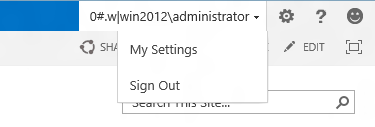
One suggestion for a fix can be found here: http://www.little.org/blog/2012/07/17/launch-your-web-browser-as-another-user/.
This “Sign in as Different User” menu item is very useful when testing applications, but it can lead to problems especially when opening documents, say in Microsoft Word. So, it may be for these reasons that the option has been removed in SharePoint 2013.
You can add the menu item back in, but I would suggest only doing this on test or development SharePoint servers. To do this, repeat this edit on all servers in your SharePoint farm:
- Locate the file \15\TEMPLATE\CONTROLTEMPLATES\Welcome.ascx and open in a text editor.
- Add the following element before the existing element with the id of “ID_RequestAccess”:
<SharePoint:MenuItemTemplate runat="server" ID="ID_LoginAsDifferentUser"
 Text="<%$Resources:wss,personalactions_loginasdifferentuser%>"
 Description="<%$Resources:wss,personalactions_loginasdifferentuserdescription%>"
 MenuGroupId="100"
 Sequence="100"
 UseShortId="true"
 />
- Save the file.
Now, the menu item shall be displayed:

Update 16-Jul-2013: As noted by a number authors (and correctly so), modifying files in the hive is not generally good practice. It’s presented here as a quick (and dirty!) solution. Look through the comments against this post for some other solutions that you might want to try too.

 Nick Grattan's Blog
Nice trick. Thanks Nick!
Oliver Bartholdson
July 23, 2012 at 8:31 pm
[…] The “Sign in as a Different User” menu option has been done away with in SharePoint 2013. Microsoft has made it known that they have worked to make SharePoint 2013 a more streamlined, efficient, out-of-the-box solution, and in doing so are discouraging users from customization. However, some of the features that were removed still need to be navigated in some way. The “Sign in as a Different User” command is one example. Nick Grattan’s SharePoint Blog gives us a workaround in, “Sign in as Different User and SharePoint 2013.” […]
Sign In as Difference User in SharePoint 2013 : Beyond Search
July 26, 2012 at 4:11 am
[…] out this post to get it added back:https://nickgrattan.wordpress.com/2012/07/23/sign-in-as-different-user-and-sharepoint-2013/Thanks Nick! Published Saturday, August 11, 2012 12:50 AM by cjg Filed under: sharepoint […]
CJG : SharePoint 2013 - Sign in as different user
August 10, 2012 at 11:52 pm
[…] by adding the code below before the SharePoint:MenuItemTemplate tag with id ID_RequestAccess(https://nickgrattan.wordpress.com/2012/07/23/sign-in-as-different-user-and-sharepoint-2013/ )<SharePoint:MenuItemTemplate runat="server" ID="ID_LoginAsDifferentUser" […]
Logging in as a different user in SharePoint 2013 Preview - ~ Just do I(nformation)T(echnology) ~
August 17, 2012 at 9:05 am
[…] by adding the code below before the SharePoint:MenuItemTemplate tag with id ID_RequestAccess(https://nickgrattan.wordpress.com/2012/07/23/sign-in-as-different-user-and-sharepoint-2013/ )<SharePoint:MenuItemTemplate runat="server" ID="ID_LoginAsDifferentUser" […]
Logging in as a different user in SharePoint 2013 Preview - Just do I(nformation)T(echnology) - Site Home - TechNet Blogs
August 17, 2012 at 9:05 am
[…] There is a post (actually a couple posts) that discuss this. In Nick’s he outlines a potential workaround https://nickgrattan.wordpress.com/2012/07/23/sign-in-as-different-user-and-sharepoint-2013/. […]
SharePoint 2013 Preview: A Few Changes That Might Surprise Users (If Not Planned For Appropriately)
September 25, 2012 at 4:54 pm
[…] pouvez trouver sur cette page une autre solution, qui est de modifier un « user control » par défaut de […]
SharePoint 2013 / 2010 / 2007 : Changer d’utilisateur quand l’option n’est pas disponible « SharePoint by Asipe (Benoît Jester)
October 15, 2012 at 9:50 am
[…] Sign in as Different User and SharePoint 2013 As you know, the very helpful option”Sign in as a Different User” is missing in SharePoint 2013 so that it’s pretty hard for you to work with multiple users on a test environment. Now you would like to have the option work on SharePoint 2013 ? You just need to read the great tip written by Nick Granttan. Follow him @NickGrattan […]
[Week 4] Top 10 SharePoint 2013 articles you should read -
November 18, 2012 at 3:22 pm
[…] Whatever.. The fix is found below and shared by Nick in this post. https://nickgrattan.wordpress.com/2012/07/23/sign-in-as-different-user-and-sharepoint-2013/ […]
Where is Sign In As Option in SharePoint 2013? « Max's Space
November 25, 2012 at 10:21 am
Hi Nick,
Nice trick!
Do you also know a way to bring it back on the access denied site?
Thank you and best regards,
Lucian
Lucian
December 7, 2012 at 2:20 pm
[…] Sign in as Different User and SharePoint 2013 […]
Alterar o Usuário Logado no SharePoint 2013 « Fabian André Gehrke
December 10, 2012 at 1:54 am
[…] Grattan muestra en su ejemplo de como agregar esta opcion al menu, sin embargo es necesario mencionar que no es una buena practica (sin tomar en cuenta que no es […]
Add Sign In as Different User in SharePoint 2013 with custom action « MVPs de LATAM
December 11, 2012 at 5:21 pm
Just go to start->programs->IE and shift-right click and “run as different user”
Kim
December 13, 2012 at 6:51 pm
Thanks for a great tip. Nick
Nick Grattan
December 13, 2012 at 9:48 pm
Smart thinking, Kim!
bmcgree1
May 10, 2013 at 10:03 pm
[…] É possível também incluir novamente a opção no menu conforme descrito em https://nickgrattan.wordpress.com/2012/07/23/sign-in-as-different-user-and-sharepoint-2013/ […]
Opção Fazer logon como Usuário Diferente não está mais disponível no SharePoint 2013 • Blog do Project
December 27, 2012 at 7:51 pm
I found a ready solution for sharepoint signin: support sign-in to facebook, microsot account, google account to sharepoint
http://sharepoint-live-authentication.shetabtech.com/
ali
January 18, 2013 at 8:41 pm
I’ve blogged about a solution that doesn’t require modifying the out of the box files. (Which is not recommended by Microsoft nor supported).
http://corypeters.net/2012/10/sharepoint-2013-sign-in-as-another-user
cbpeters
February 1, 2013 at 9:48 pm
[…] link back to Preview version? The steps to add the link back are mentioned by Nick Grattan in his blog […]
Sign in as a different user – SharePoint 2013 « SharePoint Guy
February 12, 2013 at 9:36 am
Hi,
Instead of changing OOB sharepoint and launching IE with another user I’ve created a shortcut in my favorites and changed the URL to this :
javascript:window.location.href=”http://”+window.location.host+”/_layouts/closeConnection.aspx?loginasanotheruser=true”;
Usage : navigate to your site e.g http://intranet and click on the shortcut. This will redirect you to http://intranet/_layouts/closeConnection.aspx?loginasanotheruser=true and asking you to sign in as a different user.
Samuel Levesque
February 28, 2013 at 8:05 pm
Reblogged this on Pornjed's Blog.
pornjeds
March 7, 2013 at 6:41 am
[…] https://nickgrattan.wordpress.com/2012/07/23/sign-in-as-different-user-and-sharepoint-2013/ […]
Get “Sign in as Different User” back in SharePoint 2013 | Nishant Rana's Weblog
April 24, 2013 at 11:11 am
[…] Die fehlende Option wieder ins Menü eintragen Nick Grattan hat in seinem Blog eine Methode beschrieben um die fehlende Option wieder im Menü einzutragen. Allerdings bearbeitet […]
SharePoint 2013 – Option “Sign in as Different User” fehlt | Scolab.ch
May 10, 2013 at 8:17 pm
Nice tips but what about with this feature and app model ? It seems to delete only the cookie of the web domain and not the app domain. Have you tested also this case?
Marco
June 7, 2013 at 5:21 pm
Not having this feature won’t affect users, cache and permission issues will be less due to this. This will only create problem for an IT professional while troubleshooting on a user’s desk.
Brody Blackwell
June 12, 2013 at 11:08 am
This solution doesn’t seem to work very well if you have multiple web applications or if your MySite is on another web application. When you sign in as another user, you only sign in as another user on the current web application.
Nick Hurst
July 1, 2013 at 9:16 pm
[…] https://nickgrattan.wordpress.com/2012/07/23/sign-in-as-different-user-and-sharepoint-2013/ […]
Logar com outro Usuário no SharePoint 2013 | Sharepoint 4 BR
July 4, 2013 at 2:17 pm
I’m sure that editing the Welcome.ascx user control is not really supported never mind that a future SP might over write your changes you’ll have to do it on every WFE.
A better way to do this is to deploy a simple Feature which adds the menu item back in a support way. Download and try Alt Login from here http://www.kaboodlekonnect.com/free/alt-login. It’s completely free and you get the choice of a farm or a sandbox solution. I should add that I wrote it.
Colin
July 16, 2013 at 5:53 am
Hi Colin,
Thanks for your comment and providing a more robust solution. I very much agree with you regarding changing documents in the hive. It’s presented here as a quick (and dirty!) solution to reinstating this option.
We need to look at why Microsoft removed this option. I believe it’s related to issues with the integration of the browser and client applications. If you login as a different user in the browser and open a document in Word (client app), Word will use the logged on user in the Windows session and not the browser session. This ends up causing all sorts of problems.
Regards, Nick.
Nick Grattan
July 16, 2013 at 12:15 pm
Thanks Nick, sometimes quick and dirty is just the ticket and I suspect that like me most people who need this capability use it in an development or test environment rather than in production so I think that workarounds like yours are perfectly fine in those scenarios.
I note that you gave us a working solution to this issue nearly a year ago which make you a pioneer in my book.
As to why Microsoft removed this option I think you are most probably right. It think was most likely causing some issues like the ones you describe and so the easiest remedy is just remove it from the equation.
Colin
July 17, 2013 at 8:10 am
[…] https://nickgrattan.wordpress.com/2012/07/23/sign-in-as-different-user-and-sharepoint-2013/ […]
Getting the Sign In as different user option back in SP2013 | SharePoint Hut
July 16, 2013 at 6:46 am
Hello ,
How is work with SharePoint online?
leevi05
July 31, 2013 at 2:44 pm
Leevi,
This is not possible in SharePoint Online since it is not possible to modify the 15 hive. Would suggest looking at Colin’s solution to install as an app to give the functionality in the site you need it …. or the JavaScript shortcut as recommended by Samuel above…
Steve Butler
September 24, 2013 at 1:42 pm
[…] back for all users, you can modify the Welcome.ascx file in the 15-hive on each server by following Nick Grattan’s blog post. If you just want to be able to log in with a different account without this menu option, read […]
How to Sign in as a Different User in SharePoint 2013
August 14, 2013 at 3:32 pm
Hi Nick,
Nice Article,thanks for sharing this information.Looking forward for more posts like this.
Sharepoint Developers
samuel sandeep
August 16, 2013 at 12:59 pm
[…] There is also a way to alter the Welcome.aspx file, great blog can be found here !! […]
Login is different user ….eeuuhhh ??? | Sebastian bouckaert's Blog
February 3, 2014 at 1:58 pm
[…] https://nickgrattan.wordpress.com/2012/07/23/sign-in-as-different-user-and-sharepoint-2013/ […]
SharePoint 2013 – Sign in as Different User |
March 27, 2014 at 5:54 pm
[…] it a lot to test permissions and to see how a site looks for a Reader for instance. Shit. Found a blog that has the solution, but still – that is not what you want to do! Here is how it looks […]
Some LIKES and DISLIKES in SP2013… (more to come) | SharePointBabe
April 5, 2014 at 12:16 pm
simply genius….thanks Nick! I just don’t understand why Microsoft removed this useful feature.
Aaron Chatham (@ChathamAaron)
June 17, 2014 at 1:52 pm
[…] en distintos artículos en la red como por ejemplo: https://nickgrattan.wordpress.com/2012/07/23/sign-in-as-different-user-and-sharepoint-2013/. El paso a paso consiste […]
SharePoint 2013: Opciones para “Iniciar sesión” con otro usuario! - Blog de Juan Carlos González en Geeks.MS
July 18, 2014 at 5:44 pm
[…] Sign in as Different User and SharePoint 2013 | Nick Grattan … […]
sign in as different user in sharepoint 2013
August 7, 2014 at 6:21 am
[…] Edit the Welcome.aspx to include the link again (Sign in as Different User and SharePoint 2013) […]
Sign in different user issue in SharePoint 2013 - Mohamed Abdeen
December 9, 2014 at 2:20 pm
[…] Edit the Welcome.aspx to include the link again (Sign in as Different User and SharePoint 2013) […]
SharePoint 2013, Sign in different user - Mohamed Abdeen
December 9, 2014 at 2:23 pm
[…] convoluted from the previous version and is somewhat frustrating and annoying. Others such as Nick Grattan have discussed this issue and possible […]
The Sign in as Different User option is missing in SharePoint 2013 - James Callaghan
February 18, 2017 at 9:14 am
[…] There is also a way to alter the Welcome.aspx file, great blog can be found here !! […]
Login as different user ….eeuuhhh ??? | Sebastian bouckaert's Blog
May 22, 2018 at 11:54 am